Answer is the question desk: the Q&A feed, and the Answer agent's drafts waiting for your approval.
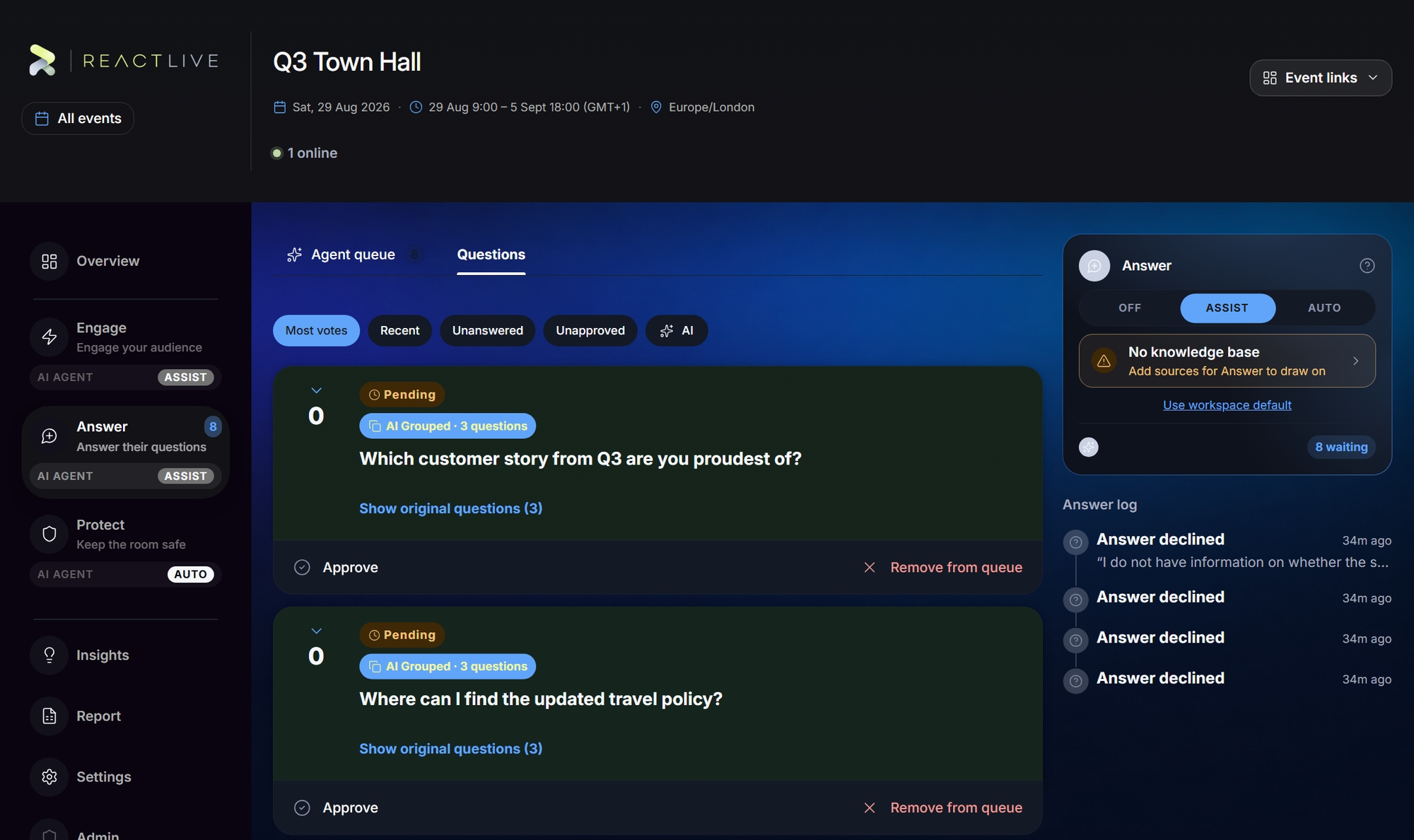
The Questions tab
Every question the audience has asked, live. Order by Most votes or Recent; filter to Unanswered, Unapproved or AI (the questions the agent grouped). A question card shows who asked (or Guest / anonymous), the vote count, comments, reactions, and any of these marks:
- Not yet approved — the audience cannot see this. Appears when the event has Questions unapproved by default on (see Settings → Engagement).
- AI Grouped · N questions — several people asked the same thing and the agent grouped them. The audience wrote those questions; only the grouping is the agent's work. Show original questions opens the cluster — the grouped question carries the votes of all of them.
- AI — the reply was composed by the agent; the tag's tooltip reads Published by the Answer agent. A human approved it on Assist; on Auto nobody did.
- New since you last looked — opening the card clears it.
The actions sit along the bottom of each card, and in the menu of the question's detail — open a card for the full text, reactions and comments, with a box to reply in the thread (replies are public):
| Action | What it does |
|---|---|
| Move to focus | Put it on the wall and at the top of the audience's screens. |
| Approve / Unapprove | Show the question to the audience, or take it off screen again without deleting it. Unapproving also removes it from focus. |
| Delete question | Removes it for the audience too — after a confirmation, because this cannot be undone. |
| Mark as answered | On the question in focus, for questions answered out loud on stage — Skip moves on without marking it. |
Comments on a question can be approved and unapproved the same way.
The Agent queue: drafts waiting on you
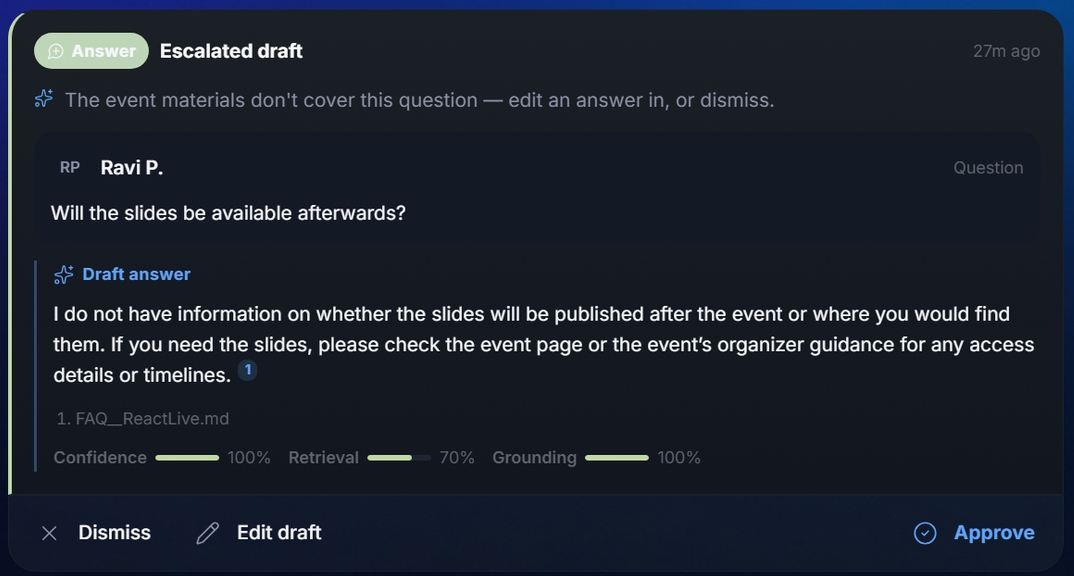
On Assist, every reply the Answer agent drafts arrives here as a card: the question, the draft, and three measures —
- Confidence
- How well the platform judges the answer is supported — computed from the two below, not self-reported by the model.
- Retrieval
- How well your knowledge sources covered the question.
- Grounding
- How much of the draft is backed by citations to those sources.
Approve publishes the reply, Edit draft lets you change it first (confidence and citations are not recalculated after an edit — the card says so), Dismiss discards it and nothing is posted.
An escalated draft is one the agent could not source — "The event materials don't cover this question — edit an answer in, or dismiss." On Auto these are the only cards you see: the agent publishes what clears the bar and hands the rest to you.
How Answer decides
- A new question arrives.
- Repeat check first. If the same question has already been answered, the existing answer is reused — instantly. At a big event this is a large share of the traffic.
- Otherwise it reads your sources, drafts a cited reply and computes the confidence.
- The publish gate: a reply can only go out if it is cited and clears the confidence bar. On Assist that means a card for you; on Auto it publishes, and anything short of the bar escalates to you instead.
Answer never initiates private contact with attendees. The one private channel — Ask Event AI — is a conversation the attendee opens, switched separately under Settings → Agents. More on Answer →
The Answer log
Merges, published and declined answers, and level changes — in the right-hand column. Where a question the agent drafted for came from is always one click away.