Three agents work the event alongside you — one runs the room, one handles questions, one watches for trouble — and a fourth reads the room and writes the report. You decide how much each of them does, and you can change your mind in the middle of a live event.
Each agent has its own colour, used wherever it appears — in the console's sidebar, badges, cards and log, and on these pages: Engage · Answer · Protect · Report. The label is always there too; the colour just lets you tell at a glance whose card, chip or log line you are looking at.
A few things are true of all of them. They are specialists, not one big AI — each sees only the signals relevant to its job and can take only the small set of actions it was built for; Protect cannot publish a poll, Engage cannot moderate a post. Every decision is enforced by the platform, not promised by the model — budgets, level gates and "never replace a human's choice" are code, not prompt etiquette. Everything is audited — every action any agent takes or proposes is written to the log with which agent, which level and why. And they speak with the event's voice: what you give them to read shapes what they say and what they must never say.
Autonomy — the one control
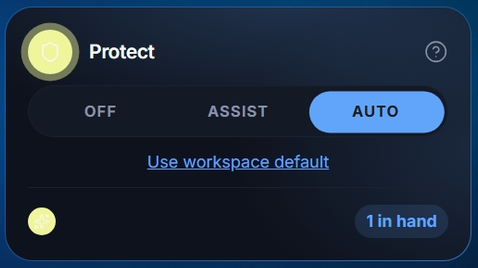
Every agent has the same three settings, and nothing else about it is configurable. The control is on the agent's card, at the top right of its own screen, and under Settings → Agents — the same control in two places, so changing one changes the other.
The agent does nothing
It stops proposing and stops acting, immediately — no analysis, no suggestions, no cost. Nothing about the event changes; questions, polls and the wall carry on working, you are simply running them yourself.
It suggests, you approve
Nothing reaches the audience until you say so. The agent does all its thinking, and its proposals arrive as cards at the top of its own screen, each saying what it wants to do and why. You approve, edit or dismiss.
It acts on its own
The same decisions, taken without you, within its guardrails. Every one is written to the log with its reason, and anything it published can be taken down the same way your own posts can.
Defaults and overrides
A new ReactLive event starts with Protect and Report on Auto, and Engage and Answer on Assist. Protect's actions are reversible holds and Report only observes, so nothing reaches the audience without a person unless you choose Auto for Engage or Answer. Each event can override each agent; an event left on the workspace default (Use workspace default) follows whatever the workspace is set to. The intended path: run Engage and Answer on Assist, watch their judgment on your real traffic, then graduate each to Auto per event when it has earned it.
Engage — runs the room
Engage watches what the room is doing — the incoming questions, the chat, the reaction stream — and proposes the thing that would keep it going. It has exactly four moves:
- Spotlight a question — put an audience question in focus on the wall.
- Publish a poll — a drafted question with its options, ready to go live; a pulse-check drawn from what the room is talking about.
- Post an announcement or call to action — a prompt for the audience app, such as pointing people at the Q&A.
- Run the closing rating poll — the end-of-event "rate this session".
How it decides. Engage checks in on the room periodically — more often when the room is busy, on a slower heartbeat when it is quiet. Each check-in it reads the current questions by merit (popularity is a booster when several people ask the same thing), the recent chat, the reactions, and its own recent actions. Its default decision is do nothing. A good stage manager is felt, not seen.
Pacing is budgeted, server-side. Roughly eight actions per rolling two-hour window and a hard cap for the whole event; the budget replenishes as time passes, so an all-day event is not starved in the afternoon and a burst of enthusiasm in hour one cannot spend the day's allowance. It always sees its own history, so it does not repeat itself.
It knows what phase the event is in. Openings get warm-up latitude (a welcome, an icebreaker poll); the middle is business as usual; the final stretch is choreographed — a last-call announcement if appropriate, then the rating poll. The rating poll is guaranteed: even if the room has gone quiet, the platform publishes and spotlights it before the event ends.
It knows when a room is dead. No questions, no chat, no reactions — it skips the check-in entirely (except at the opening and the close). During a lunch break it does nothing and spends nothing; when the room wakes up it looks back over the whole quiet period so a question parked during the break still surfaces.
It never invents facts. Engage surfaces questions; it does not answer them, and it is barred from stating logistics as fact unless they are in the event's materials. Everything it publishes is validated by the platform — length limits, no markup, links only to real addresses.
Engage and your focus — read this bit
On Assist, an approved publish always takes the spotlight — even over an item you focused earlier — because approving is the most recent human choice. On Auto, Engage is more deferential, not less: it fills an empty spotlight and replaces its own earlier item, but never evicts something a human put there. Same rule in both cases: the most recent deliberate human choice wins.
Its proposals sit under Engage → Agent queue. Its own log is in the right-hand column of that screen.
Answer — handles questions
Answer works the question queue. It drafts replies from what it has been given to read, merges the same question asked ten different ways into one, and hands back anything it cannot source.
- Draft a reply — with the sources it used, so you can check it before it goes out.
- Merge duplicates — one question stands for the cluster, carrying the votes of all of them.
- Escalate — when the answer is not in its sources, it says so instead of guessing.
- Pick up an unattended chat — an Event AI conversation nobody has replied to.
The publish gate. Repeat questions reuse the existing answer instantly. New ones are drafted from your knowledge sources with a confidence computed by the platform from how well the sources covered the question and how thoroughly the draft is cited — the model is not asked to grade its own homework. A reply can only go out if it is cited and clears the bar. No citations, no publish — full stop. On Assist every draft is a card you can edit before publishing; on Auto confident, cited answers publish on their own and everything else escalates to you as a draft.
Answers are attributed as AI-written on the content itself; the audience is never misled about who is speaking. Answer works the public Q&A only — it never initiates private contact with attendees.
Its drafts and the question feed are under Answer. What it is allowed to read is set in Settings → AI knowledge.
Ask Event AI — the private conversation
Everything above is Answer's public side. Ask Event AI is its private counterpart: a conversational chat an attendee opens from the audience app with the event's AI, for questions about the schedule, the speakers or the venue.
- Attendee-initiated, always. The agent never starts a private conversation. Follow-up questions keep their context.
- Private means private. Visible only to that attendee and the event's moderators; never in the public feed, never grouped or queued as a public question.
- Same brain, same rules. The same sources, the same citation discipline, the same voice.
- It knows when to hand off. When it cannot answer it says so — "a moderator will follow up here" — and the conversation is flagged under Insights → Event AI for a person.
- Bounded. Conversations have turn caps and quotas, so one very chatty attendee cannot run up an unbounded bill.
- Its own switch. Event AI conversations under Settings → Agents is separate from public Answer. Off hides the card; Assist queues every reply for approval; Auto replies directly. A conversation feels broken when each turn waits minutes for a human, so Auto is the natural destination for this surface once it is trusted.
Protect — watches for trouble
Protect reads everything the audience posts before the room does, and rates what it finds. Its assessments carry a risk level, because "possible personal data in a comment" and "abuse" are not the same decision.
- Hide a post — abusive or unsafe content, off the wall.
- Flag for review — it is not sure, so you decide.
- Block spam — duplicate floods from one device.
- Rate limit — one participant posting faster than a person can type.
- Clear a flag — a false positive, post restored.
On Assist, posts flow as normal and concerns become cards for you. On Auto, a concerning post is held before the audience sees it — checked, then released (clean posts appear a beat later and nobody notices) or kept held with a flag for your review. The author still sees their own post immediately; moderators see everything either way. If the AI is unavailable, Protect fails safe: a post it could not check stays held for a person rather than slipping through. It never deletes anything — held posts go to a human; deletion is a human act.
The queue is under Protect. This is the agent most events should leave on Auto.
Report — reads the room
Report only observes — it never posts, never touches content, never acts — so Assist and Auto are identical and it is effectively on or off. It produces three layers at different rhythms: engagement (continuous — participants, activity, votes, reactions), sentiment (every couple of minutes, from what people typed), and takeaways (roughly every ten minutes — a short synthesis of the themes being raised). It is honest about thin data ("not enough signal yet"), keeps sentiment separate from engagement, and freezes the final report only once the room has genuinely gone quiet after the end. You meet its output on the Overview, in Insights and in the Report.
Suggestion cards
On Assist, everything an agent wants to do arrives as a card. Each one carries: whose it is (the agent's chip), what kind of decision it is (and, for Protect, how risky it judged the content), why — the agent's own sentence explaining what it noticed, a preview of what the audience would actually see, and the verbs: approve, edit first, or dismiss.
The log
Every action an agent takes is written down: what it did, what it was about, and when. Each agent's own log is in the right-hand column of its screen; the combined one is on the Overview, filterable by agent. This is the record to check when something appeared on screen and you did not put it there — on Auto it is the only place that decision is visible.
The two AI marks on content
- AI — the small tag on a poll, update or reply says an agent composed it; hover it to see which. A human approved it on Assist; on Auto nobody did.
- AI Grouped · N questions — the pill on a question says several people asked the same thing and the agent grouped them. The audience wrote those questions; only the grouping is the agent's work. Show original questions opens the cluster so you can read them.
Staying in control
- Will an agent post to the audience without me?
- Only on Auto. On Assist it cannot publish anything — the card sits there until you act on it, and expires if you do not.
- Can I stop all of it mid-event?
- Set the three controls to Off. It takes effect immediately and nothing else about the event changes.
- Can I undo something an agent did?
- Anything it posted can be removed or hidden exactly like a post of your own, and a hidden post can be restored. Start from the log — it says what happened and when.
- Won't Engage spam my event?
- It cannot, structurally: budgets and caps are enforced by the server, its default action is do nothing, it sees its own history, and it goes silent in dead rooms.
- How do I know the answers aren't made up?
- Answer can only publish what it can cite from your own materials, and its confidence is computed by the platform from measurable coverage. Below the bar it hands off to you instead of publishing.
- Who can change these settings?
- Admins and moderators. Presenters run the event and do not see the autonomy controls — the agents still work, they just are not theirs to configure.
- Does the level reset when the event ends?
- No. Autonomy belongs to the event, not to a session, so it is where you left it next time you open the console.
What the agents never do
- Never act with an agent switched Off — off means off, including no analysis.
- Never delete audience content — they hold and flag; deletion is a human act.
- Never initiate private contact with attendees — Ask Event AI is a conversation the attendee opens.
- Never impersonate a human — AI-authored content is attributed as such.
- Never replace a human's spotlight choice without a human's approval.
- Never publish an uncited answer.
- Never exceed their action budgets — the server enforces them, not the model.
- Never act invisibly — every action and proposal is in the queue and the log.