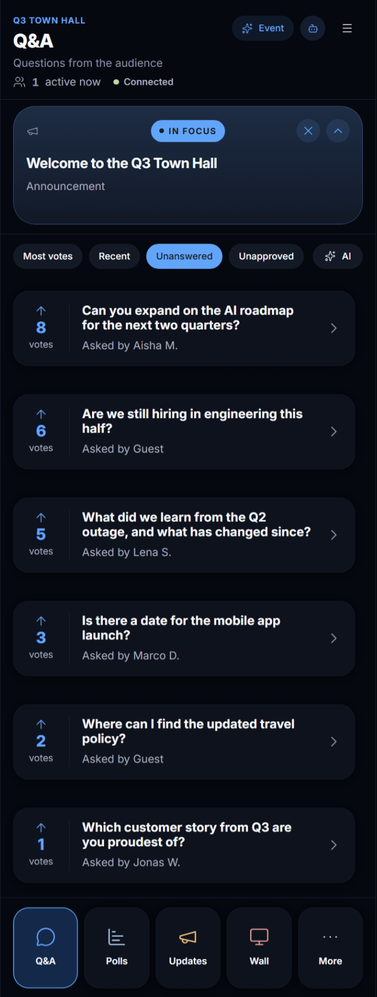
The mobile console is the console on a phone — the queue, polls, updates, In Focus and the wall controls — for running the event from the stage or the floor instead of the back of the room. A presenter with a phone in hand can take the next question, launch the poll, and put the answer on the wall without looking away from the audience.
Opening it
Event links → Mobile console in the console, or the Mobile console tile on the events list, gives the link; open it on the phone. It is for moderators only: sign in with the email and password of a moderator of this event, and the console checks you may access it before showing anything. Bookmark it on the phone's home screen for the day.
The screens
- Q&A
- Questions from the audience — Most votes, Recent, Unanswered, Unapproved, and AI for the grouped ones. Approve, reply, mark answered, Move to in focus. AI-grouped questions show as one card with the originals inside.
- Polls
- Drafts and live polls. Launch, show or hide results, close, put on the wall. New polls can be drafted here too.
- Updates
- Announcements to the room: drafts, publish now, unpublish. Quick text to audience is the one-line message that reaches every screen.
- In Focus
- What is on the wall now, with clear; and Spotlight history — everything that has been in focus, newest first, to put something back up.
- Wall
- The same wall controls as the desktop console: main view, QR, reactions, name, stats.
- Event
- The live insights on a phone: Content, Summary, Sentiment, Reactions, Feedback (the rating), and after the end, the recap.
- Event join code
- The code and QR to show from the phone, with share.
- AI agents
- Each agent's level — Off, Assist, Auto — for moderators. Presenters who are not moderators do not see this.
- Settings
- The basics, the features and the reaction set.
A rhythm that works on stage
- Keep Q&A → Unanswered open.
- Take a question: Move to in focus so the room reads it while you answer; Mark as answered when you are done. The next one is already at the top.
- Between sections, Polls → Launch poll on the one you drafted beforehand; put it in focus so the room watches the tally move.
- Close with Feedback in focus — the one-to-five rating.
Two people, two consoles
The presenter runs In Focus from the phone; a moderator at the back handles approvals, drafts and Protect from the desktop console. Both see the same live state, and the agents' proposals go to whoever opens them first.