 Protect
Keep risky content out of the room.
Protect helps event teams review audience contributions before inappropriate, sensitive, or event-specific content becomes a live problem.
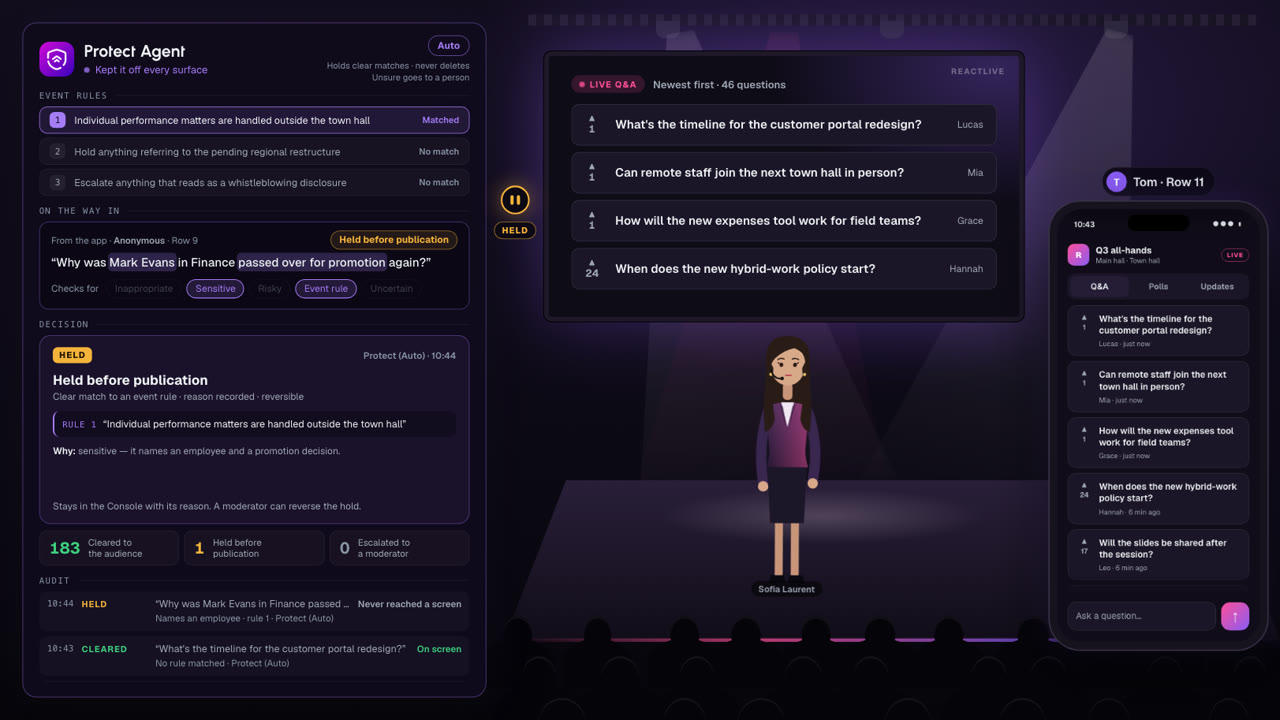
Watch Protect at work.
A town hall in under two minutes. Protect checks every contribution on the way in. Most are cleared; one naming a colleague is held before anyone sees it, never deleted; and one it can’t judge goes to a moderator.
Moderation is a timing problem, not a volume problem.
A moderator reading a live queue has seconds per item. Most contributions are fine. A small number are not, and those are the ones that end up on a screen in front of the whole organisation.
The damage is rarely done by content that was hard to judge. It is done by content nobody got to in time.
Prevention is more useful than deleting something after thousands of people have already seen it.
Protect works on the way in. It is the difference between a moderation queue and a moderation incident.
Every contribution, before the audience sees it.
- Inappropriate content
- Abuse, harassment, and language that has no place in an organisational event.
- Sensitive content
- Contributions naming individuals, disclosing personal circumstances, or touching matters that belong in a private channel rather than a live room.
- Risky content
- Material that could create a legal, regulatory or reputational problem if it appeared on a screen in front of the whole organisation.
- Event-specific content
- Whatever your event says is off-limits — an unannounced acquisition, a restructure, a customer name, a topic reserved for a different forum.
- Uncertainty
- Contributions Protect cannot confidently judge. These are escalated rather than guessed at.
Protect recommends. A human decides.
In Assist, Protect does not hold or release anything on its own. It flags what needs attention, explains why, and puts it in front of a moderator in the Console.
- Flagged items are ordered by how urgent they look
- The matched rule or reason is attached to every flag
- The moderator releases, rejects or escalates
- Nothing reaches the audience on Protect’s judgement alone
Contribution flagged — names an individual employee
Matched event rule: “Individual performance matters are handled outside the town hall.”
Illustrative view.
Hold automatically. Never delete silently.
In Auto, Protect holds content that clearly matches your event rules before it reaches any surface. Holding is the automated action — not deletion.
- Every held item stays visible in the Console with its reason
- Any hold can be reversed by a moderator
- Anything Protect is unsure about is escalated, not actioned
- The event team can take control at any moment
This is why Protect is the agent most teams automate first: the automated action is reversible, and the cost of not acting in time is not.
Uncertainty goes to a person.
Some contributions are genuinely ambiguous. A question about redundancies might be a fair thing to put to leadership, or a disclosure that should not be on a screen.
Protect does not resolve that kind of judgement by guessing. It escalates, with the reason it is unsure, and the room waits for a human.
If a risky contribution cannot be safely evaluated, the system favours review rather than blind publication.
Your event decides what is off-limits.
General-purpose moderation catches abuse. It does not know that this particular all-hands must not touch the pending acquisition, or that this customer conference must not name competitors.
Event rules are set per event, in plain language, alongside the event’s tone. Setup helps prepare them.
- Individual performance matters are handled outside the town hall
- Do not publish contributions naming a named employee
- Hold anything referring to the pending regional restructure
- Escalate anything that reads as a whistleblowing disclosure
Illustrative. Rule format and capabilities
Every moderation decision leaves a record.
Moderation is the part of a live event most likely to be questioned afterwards. The answer should not depend on anyone’s memory.
- What was held
- The contribution, as submitted.
- Why it was held
- The rule or category that matched, and the confidence where relevant.
- Who decided
- Whether Protect acted in Auto, or which moderator made the call.
- What happened next
- Released, rejected, escalated — and when.
- Where it went
- Whether it ever reached an audience surface.
Moderating employee contributions is sensitive work.
Protect reads what employees write. That deserves the same scrutiny as any other system handling employee communication, and it is a question your IT, security and data teams will ask.
The Security page states only what is verified today — including which providers are involved and what data they see. We would rather have a shorter list than an impressive one.
Protect the room before you need to clean it up.
On the blog: Moderation that doesn’t make you choose between safety and speed