What is an AI event co-pilot?
An AI event co-pilot is an AI system that works alongside the people running a live event. It uses live event context to help manage audience questions, moderation, engagement and event intelligence — before, during and after the event — while the event team stays in control.
ReactLive is an AI event co-pilot. This page explains what the category means, what it does at each stage of an event, and how it differs from the AI tools it is often confused with.
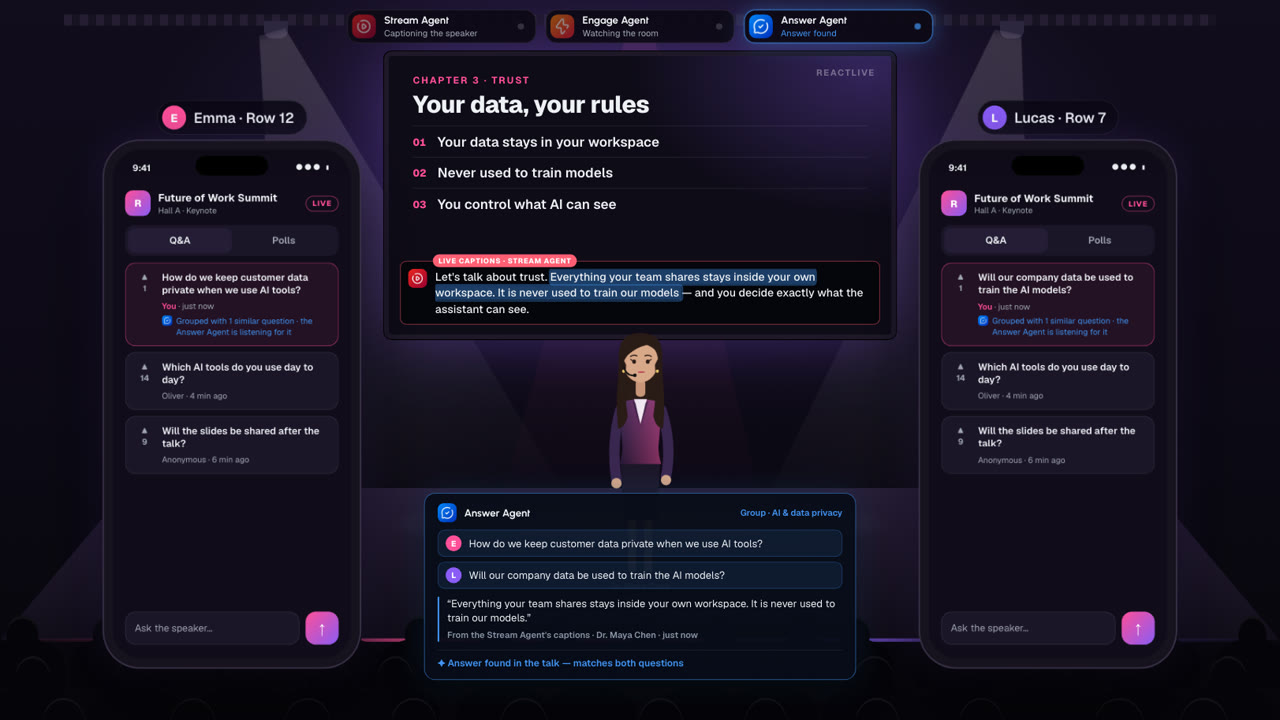
Watch a co-pilot at a keynote.
A keynote in about a minute. Two attendees ask the same thing in different words. Answer groups them, the Stream Agent captions the talk, and when the speaker covers it, both phones get the answer.
An AI that works the event with your team, not instead of it.
A live event produces more than a small team can read: questions arriving faster than a moderator can triage them, the same concern in a dozen phrasings, a contribution that must not reach the screen, a room that goes quiet. An AI event co-pilot takes on the reading, grouping, drafting and flagging — and hands every consequential decision to a person.
It is called a co-pilot for a reason. The event team decides what it is allowed to do, event by event, and can take control at any moment.
- Reads every question, vote and reaction as it arrives
- Answers only from material supplied to the event, with the source attached
- Holds risky contributions before the audience sees them
- Suggests when the room needs a poll, a spotlight — or nothing at all
- Turns the live read of the room into the event’s record
- Acts only within the permissions the team sets
Before, during and after the event.
An event co-pilot is most useful while the event is running, but the work starts earlier and the value lasts longer.
Before: prepare the event
The team loads what the audience is likely to ask about — FAQs, policies, decks, speaker material — and writes the event’s rules in plain language: what is off-limits, what tone to use, what must go to a person. In ReactLive, Setup helps prepare it, and Test mode shows what the agents produce before anyone joins.
During: run the room
Every contribution is analysed by specialist agents at once. Protect holds what should not reach the screen. Answer groups repeats and drafts sourced answers. Engage reads participation and suggests the next interaction. The team approves, edits or dismisses.
After: understand what mattered
The live read of the room becomes the record: recurring themes, how sentiment moved, questions that were never answered, what leadership should follow up — and every agent decision in the audit history. In ReactLive, that is Report.
A co-pilot, not an autopilot.
Live events are where mistakes are most visible, so control is not a setting buried in an admin panel. It is the structure of the product.
- Off, Assist or Auto, per agent
- Each agent is set independently for each event. In Assist, it recommends and a person approves. In Auto, it performs only the types of work approved in advance.
- Humans outrank agents
- A deliberate human decision is not quietly overridden by automation.
- No source, no automatic answer
- Answers come from the event’s own material. When nothing supports an answer, the question goes to a person with no draft attached.
- Held, not deleted
- Automated moderation holds content for review. Any hold can be reversed, and the reason is kept.
- AI is labelled
- AI output is never presented as if a moderator or speaker wrote it.
- Actions are visible
- The team can see what each agent suggested, did and escalated, and why.
How an AI event co-pilot differs from other AI tools.
Several kinds of software use AI around events and meetings. They do different jobs.
- Meeting AI and notetakers
- They join a call, transcribe it and summarise it for the people who were in it, mostly afterwards. An event co-pilot works a live audience in real time — answering, moderating and engaging while the event is still running. ReactLive compared with Read.ai and notetakers.
- Attendee assistants in event apps
- Some event platforms use “copilot” for an assistant inside the attendee app that recommends sessions or answers logistics questions. That assistant serves each attendee. An event co-pilot serves the team running the event, and works on the live audience as a whole.
- Event management software
- Registration, ticketing, agendas and venues stay where they are. An event co-pilot operates the live audience layer alongside them. How ReactLive fits your event stack.
- Q&A and polling tools
- They collect questions and run polls. Reading, grouping, answering and moderating is still done by hand. Live Q&A with an AI event co-pilot.
- General chatbots
- A chatbot answers from a general model. An event co-pilot answers from the event’s own material, cites it, and does not answer when there is nothing to cite.
- Post-event analytics
- Analytics describe the event after it ends. An event co-pilot surfaces what matters while there is still time to act, and keeps it as the record afterwards.
Built for live events where the audience matters.
Town halls, conferences and corporate events — in the room, online, or both. Remote participants join the same event through the Event Page.
Town halls & all-hands
Employee Q&A at all-hands scale, with sensitive contributions held before they reach the screen.
Town hall Q&A
Conferences
A readable queue for every high-attendance session, and what the audience asked, session by session.
Conference Q&A
Corporate events
Summits, kickoffs, launches and executive Q&A — events that get one attempt.
Corporate event Q&A
Agencies
More rooms, more questions and more moderation without scaling operator headcount linearly.
For production teams
Podcasts & creators
Live Q&A and AMAs where fans get an answer in your voice.
Live AMAs
The product
Console, Audience, Wall, Event Page and Report, all working on one live event.
How ReactLive works
Questions about AI event co-pilots.
What is an AI event co-pilot?
An AI event co-pilot is an AI system that works alongside the people running a live event. It helps with audience questions, moderation, engagement and event intelligence before, during and after the event, while the event team keeps control of what it is allowed to do.
How can AI help at a live event?
By doing the reading a small team cannot keep up with: checking each contribution before it reaches a screen, recognising duplicate questions, drafting answers from the event’s own material, noticing when participation drops, and picking out the themes leadership should follow up. People still make the consequential decisions.
Can AI moderate live Q&A?
Yes, within limits you set. In ReactLive, Protect reviews every contribution before the audience sees it. In Assist it flags and explains; in Auto it holds content that clearly matches your event rules. Holding is reversible, and anything Protect is unsure about goes to a moderator.
Can AI answer audience questions during an event?
Yes, when the answers come from material supplied to the event. ReactLive’s Answer agent drafts replies with the source attached and groups repeated questions. If nothing in the event knowledge supports an answer, it does not draft one; the question goes to a person.
What is the difference between an event co-pilot and a meeting AI?
Meeting AI records and summarises a call for its participants, mostly afterwards. An event co-pilot works a live audience in real time — answering, moderating and engaging while the event is still running — for the team responsible for it.
Does the event team stay in control?
Yes. Each ReactLive agent is set to Off, Assist or Auto for each event. In Assist, nothing reaches the audience without a person approving it. The team can take over from any agent at any moment.
Does an AI event co-pilot replace event management software?
No. Registration, ticketing, agendas and broadcast stay in the tools you already use. An event co-pilot handles the live audience: the questions, the moderation, the engagement, and what the audience told you.