Built for conference organisers — join the waitlist

From to
participation in three seconds.

The AI audience engagement lead for conferences.

One QR code on the badge, the lanyard, the slide. Attendees scan and they're in — asking, voting, posting, chatting. No app to download. No account to make. No event code to mistype.

QR-first onboarding · Auto-Answer Loop · Question clustering · Hallway chat · Multi-track support
Industry conferences / Developer summits / Trade shows / Customer events / Sales kick-offs / Academic symposia / Product launches /

The conference engagement tax

You spent six months on the conference. Eleven percent downloaded the app.

Conference engagement tools have been quietly broken for a decade. The forced app install kills participation before the keynote starts. The 6-digit codes get mistyped. The "engagement" you do measure is mostly your own staff. The questions in the room never make it to the speaker.

01 Friction

The download cliff.

By the time someone has found the app on the App Store, agreed to push notifications, made an account, and confirmed an email — the keynote has started. Most don't bother. You're left engaging the 11% who did.

02 Codes

The 6-digit lottery.

"Go to slido.com and enter code XJ4-K91." Half the room mistypes it. A third end up at the wrong event. The MC repeats it three times from the stage and you can feel the energy drain out of the room.

03 Silos

One thing per app.

Q&A in Slido. Polls in Mentimeter. Schedule in Whova. Networking on a Slack workspace that nobody joins. Five tools, five logins, attendee fatigue by the coffee break.

04 Silence

The hallway track stays in the hallway.

The best conversations happen at the coffee station, between two people who'd never have met without each other physically being in the room. None of it makes it back to the rest of the attendees, the speakers, or you.

The QR code moment

Three seconds. No app. No account. No code.

ReactLive is a web surface, not an app. One QR code in the venue points to your event. Attendees scan with the camera they already have open, and they're inside the chat — typing, voting, posting — before the next slide. Engagement rates climb because the friction is gone.

The old way

~90 seconds, if you're patient
  1. 01

    Find & install the conference app

    App Store, search, download, agree to permissions.

  2. 02

    Create an account & verify email

    Hope the venue Wi-Fi is up. Switch tabs to find the verification email.

  3. 03

    Find the event code

    Squint at the slide. Mistype it. Try again.

  4. 04

    Join the right session

    Pick from a list. Realise it's the wrong one. Go back.

Result: 11% engagement. Most attendees give up.

With ReactLive

~3 seconds, by design

Scan

3 sec

DevConf 2026

How will this affect API rate limits?

▲ 47

Open-source roadmap?

▲ 31

📣 ANNOUNCEMENT

Coffee break in 10 min, Hall B.

Inside

  1. 01

    Open the camera

    Already on every phone. No download.

  2. 02

    Tap the link

    Opens the event surface in the browser. No account.

  3. 03

    You're in

    Asking, voting, posting, chatting. Before the next slide.

Result: 73% engagement. Because the questions get answered, not queued.

One QR, two modes

One code per session, or one for the whole conference.

Print one QR on every session slide for talk-by-talk Q&A. Or print one on the badge for the whole event — attendees stay in the same chat from keynote to closing party. The organiser picks. Same product, two shapes.

PER SESSION

Talk-by-talk

Each session is its own room. Q&A and polls scoped to one talk. Best for multi-track events.

WHOLE EVENT

One persistent chat

One badge QR, three days of conversation. Sessions, hallway chat, announcements all in one surface.

The Auto-Answer Loop

Five thousand attendees. One queue, resolved.

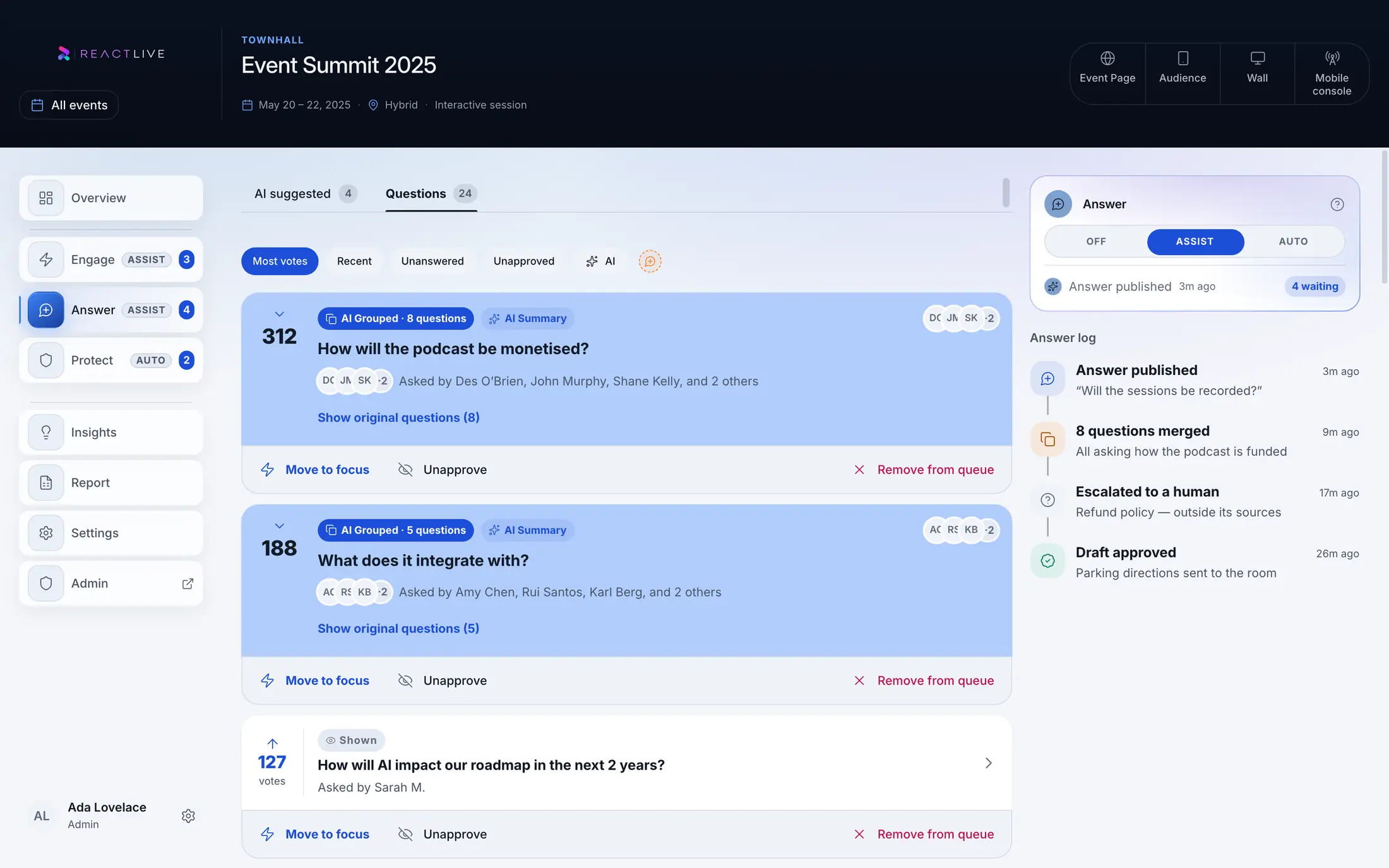
Conferences don't fail because the audience has nothing to say. They fail because eight hundred questions arrive and a moderator can't read them all. ReactLive clusters incoming questions, matches them against three answer sources, and resolves most of them automatically — so the moderator spends time on the questions that actually need human judgement.

01 Live transcript

What the speaker just said.

The speaker covers rate limits at 14:08. Three minutes later, four new attendees ask about rate limits. ReactLive matches their questions to the moment, cites the exact phrase, and replies — with the timestamp linking back so anyone can verify.

CITED · 14:08:22
We're raising the rate limit to 10k/min for paid plans starting next month. Free tier stays the same.
02 Speaker pack

What's already in the docs.

Drop in the talk slides, the supporting docs, the changelog, the API reference. Factual questions get matched to the source page and answered with a direct citation — not a paraphrase, not a hallucination.

CITED · api-v3-changelog.md

"v3.2 deprecates the legacy /events endpoint. Migration guide at docs/migration."

03 Prior answers

What the room already heard.

Once a question is answered — by the speaker, by ReactLive, by the moderator — the answer is reusable. Variants get the same answer, instantly, for as long as the conference runs.

"Will rate limits affect us?" 94%
"What about API throttling?" 88%
"Free tier limits?" 61%

Match confidence above your threshold? Answered. Below? Held for the moderator.

Before they're answered, they're clustered

Eight hundred questions become twenty themes.

Every question that comes in is grouped with semantically similar ones, voted on by attendees, and ranked by heat. Your moderator sees twenty topics, not eight hundred lines. Strategic ones go to the speaker; repeats and factual ones go to the Loop; out-of-scope ones get logged with an owner.

API rate limits

17 questions clustered

→ Stage

Migration timeline

12 questions clustered

→ Auto-Answer

Pricing roadmap

8 questions clustered

→ Follow-up

The moderator is always in the loop. ReactLive drafts; the moderator decides what ships, what holds, what goes to the speaker. You're never auto-piloting.

Five things, one surface

Every engagement primitive. All AI-augmented.

Q&A, polls, comments, announcements, and hallway chat — under one QR code. Each one is doing AI work in the background: clustering, sourcing, sentiment-tracking, drafting. Your moderator runs five threads at once, with a co-pilot.

AI
01
Q&A

Ask, cluster, answer.

Eight hundred questions cluster into twenty themes. Repeats get auto-answered from the speaker's words. The moderator sees the priority list, not the inbox.

API rate limits

▲ 47 · 17 clustered
AI
02
Polls

AI-suggested polls.

The Loop spots a moment in the talk worth polling and drafts the question. The moderator approves with one tap. Live bar chart on the projector. Multiple choice, word cloud, rating, ranked.

Yes 78%
No 22%
AI
03
Announcements

AI-drafted, organiser-sent.

Track changes, room moves, sponsor giveaways. The AI listens to the organiser's mic and drafts the announcement; one tap and it pins to the top of every attendee's chat. No app permissions required.

📣 ANNOUNCEMENT · 09:42

Keynote moved to Hall B. Starts in 10 min.

AI
04
Comments

Sentiment, tracked.

Light reactions and short comments roll up into a live sentiment read — by speaker, by topic, by minute. Speakers leave with a temperature graph, not just a Q&A log.

🔥 24 👍 18 🎯 12 🤔 7
AI · New
05
Hallway chat

Topic-matched networking.

Audience-to-audience threads. The AI suggests topic rooms based on who's in the audience and what's being discussed — so attendees find each other around what they care about, not LinkedIn URLs.

@maria · 14:08

Anyone else playing with WebGPU shaders?

@jules · 14:09

Yes — table 4, find me!

Five agents, one event

The team you'd hire if budget weren't a thing.

Five specialised AI agents work the conference end-to-end — before, during, and after. They ingest your speaker pack, set guardrails, run the queue, draft the answers, and write the report. The organiser oversees; the agents do the labour.

Before

Setup

Ingests speaker decks, agenda, sponsor briefs, prior-year Q&A. Builds the context graph the rest of the team works from.

Always

Protect

Guardrails the room. Filters spam, slurs, off-topic noise. Flags off-limits topics for moderator review. Audit log of every action.

During

Engage

Clusters questions into themes, ranks by vote and heat, suggests polls and announcements when the conversation calls for them.

During

Answer

Runs the Auto-Answer Loop. Drafts cited replies from the live transcript, the speaker pack, or prior answers. Moderator approves; reply ships.

After

Report

Five-minute exec summary in your inbox. Themes, sentiment, top questions, sponsor performance, NPS. The deck for next year, prefilled.

The agent stack

Each agent has a SOUL.md file — its tone, vocabulary, escalation rules, and red lines. Version it in git. Share across events. Edit as your voice evolves. The agents read this on every interaction so they sound like you, not like a default chatbot.

Meet the team →

One conference, one chat

The conversation doesn't stop at the session door.

With whole-event mode, attendees scan once and stay in the same chat from keynote to closing reception. Sessions thread inside it. Hallway conversations carry over. The morning's good question is still findable at lunch.

09:00

Keynote

QR scanned. 1,847 in the room.

73% engaged

10:30

Coffee break

Hallway threads spike. WebGPU table forms.

↑ 4× chat activity

11:00

Track A & B

Two sessions, scoped Q&A inside the same chat.

218 questions

14:00

Sponsor demo

Live poll: which feature should ship first? 600 votes.

Branded panel

17:30

Closing

Wrap survey pushed. NPS landed by the time people queue for the bar.

NPS 64

One QR. One chat. Everything in context.

Day 1 of 3 · DevConf 2026 · 1,847 attendees

Built for organisers

The operational bits, handled.

Multi-track events, sponsor branding, moderation roles, schedule integration, GDPR, exports for the post-event report. The unsexy infrastructure your attendees never see, built by people who've run conferences before.

01

Multi-track support.

Sessions running in parallel each get their own scoped Q&A and polls, all inside the same event chat.

02

Moderation roles.

Per-session moderators, organiser admins, sponsor-only posters. Everyone sees what they need; nothing they shouldn't.

03

Sponsor branding.

Header logos, sponsored polls with attribution, branded announcement panels. Sponsors get visibility without buying their own app.

04

Schedule integration.

The agenda lives inside the chat. Tap a session, jump straight into its Q&A. Tap "join" to follow live.

05

Multi-language.

Live transcript and Q&A translation across 16 languages. International audiences participate in the language they think in.

06

Engagement analytics.

Live dashboard during the event. CSV export after. Real numbers for the post-event report and next year's sponsor deck.

07

Wi-Fi resilient.

Optimised for venue Wi-Fi reality. Offline queueing, automatic reconnect, low-bandwidth mode. The chat stays up when the conference Wi-Fi melts.

08

GDPR-clean.

No-account model means no email harvesting unless attendees opt in. Anonymous by default; data residency configurable.

No account, by design

Engagement without surveillance.

The download wall isn't just bad UX — it's a privacy ask attendees never agreed to. ReactLive doesn't need an account to work. Anonymous by default. Identifiable only when an attendee chooses.

Anonymous default.

Attendees don't make an account. They get a session ID. Nothing about them is collected unless they choose to share a name in hallway chat.

Data residency.

EU and US regions on day one. Attendee data stays in the region of your event, not yours.

Moderation tools.

Auto-filter for slurs and spam. Per-session moderator roles. One-tap remove on any message. Audit log of every action.

Clean export.

Post-event CSV with engagement stats, top questions, poll results, NPS. Attendee-anonymous unless they opted in to a contact share.

Pricing

Per event. Not per attendee.

Most engagement tools price by attendee, which means you pay more the more successful your event is. We charge per event. You scale; the bill doesn't.

Pre-launch · finalising tiers

Free tier, self-serve, enterprise when needed.

We're locking pricing in with our beta cohort. Waitlist members get final pricing first, plus founder support during onboarding.

Honest comparison

ReactLive vs Slido. Where the gap actually is.

Slido is a good Q&A tool. It's been the default for a decade. But the category has moved — attendees expect more, organisers need more, and AI changes what's possible. Here's an honest, row-by-row look at where ReactLive does the same job differently, and where it does jobs Slido doesn't do at all.

What organisers care about

Slido

ReactLive

Onboarding

How attendees join

6-digit code typed into slido.com

~30 seconds, mistyped often

QR scan, browser opens

~3 seconds, no typing

Q&A at scale

800 questions, one moderator

Moderator triages by hand

Most questions never seen

Auto-clusters into 20 themes

Moderator works the priority list

Repeat questions

Five attendees ask the same thing

Manual dedup, or speaker repeats

Eats stage time

Auto-answered with citation

Sourced from speaker, docs, or prior

Sentiment & themes

Reading the room, in real time

Not in the product

Manual review, post-event

Live sentiment + theme dashboard

Speaker sees the temperature

Attendee networking

The hallway track

Not in the product

Buy a separate tool

Topic-matched hallway chat

Same surface, no extra login

Post-event report

For the next sponsor deck

CSV export

You build the deck

5-min auto-generated summary

Themes · NPS · top questions · sponsor stats

Sponsor engagement

Beyond a logo on the slide

Branding only

No measurable interaction

Branded polls + dedicated channels

Sponsors get measurable engagement

Pricing model

What scales the bill

Per attendee

Successful events cost more

Per event

You scale, the bill doesn't

Comparison based on Slido's published feature list and our own product as of beta. We've tried to be fair — if you spot something we got wrong, tell us and we'll update.

FAQ

The questions conference organisers ask first.

01What happens when the venue Wi-Fi dies? +
ReactLive is built for venue Wi-Fi reality. The client-side caches messages and poll votes locally and syncs them when the connection returns. There's a low-bandwidth mode that strips the chat to plain text and queued sends. We've stress-tested it against the kind of patchy 4G that you get inside concrete-and-rebar conference centres. It's not magic, but it's resilient.
02How do attendees actually find the QR code? +
You decide. We generate QR codes you can drop on session slides (per-session mode), badge prints (whole-event mode), table tents, lanyards, sponsor banners, the back of the programme — anywhere. Most organisers use a combination: one master QR on the badge, plus per-session QRs on the title slide of each talk for scoped Q&A.
03Can attendees post anonymously? +
By default, yes. Q&A and polls are anonymous unless an attendee chooses to attach a name. Hallway chat surfaces a chosen handle (which can be a pseudonym). Organisers can configure per-channel rules — for example, sponsor announcements require organiser-only posting, while Q&A stays open and anonymous.
04How do you handle multi-track conferences? +
Each track is its own scoped channel inside the event chat. Attendees in Hall A see Hall A's Q&A; attendees in Hall B see B's. Per-track moderators run their own queues. The shared spaces (announcements, hallway chat, schedule) stay common across the whole event. One QR, but the right context follows you around.
05What languages do you support? +
Sixteen at launch — covering the major European, Latin American, and Asian markets. Live transcript and Q&A translation work in real time, so an attendee can ask a question in Spanish and the moderator sees it in English. Our roadmap covers another twelve languages by end of next year.
06Can sponsors get visibility without their own app? +
Yes. Sponsored polls (with attribution), branded announcement panels, header logo placements, and dedicated sponsor channels — all inside the same surface. Sponsors get measurable engagement (poll responses, channel views) without forcing attendees to leave the experience or download anything.
07What does the post-event report look like? +
Engagement rate, top questions per session, poll results with breakdowns, NPS distribution, sponsor channel performance, hallway chat themes. A live dashboard during the event, a CSV export after, plus a one-page exec summary auto-generated for stakeholders. The data your sponsor deck for next year actually needs.
08Can we white-label it? +
Annual plans include logo, colour theming, and a custom subdomain (chat.yourconference.com). Enterprise plans include full theme control and the option to remove ReactLive branding entirely.
09Is Slido enough for what I need? +
For a small internal Q&A session with one moderator and 50 attendees? Probably yes. For a 2,000-person industry conference where eight hundred questions arrive in an hour, sentiment matters, sponsors want measurable engagement, and your team has to ship a post-event deck on Monday? You'll feel the gap. The full row-by-row comparison is in the table above.

Can't find what you're looking for? Ask us directly.

The waitlist

Run your next conference QR-first.

Beta is opening to small cohorts of conference organisers running events of 200 to 5,000 attendees. Locked-in pricing for the first year. Founder support, not ticket queues.

Join the waitlist

No spam. We'll email when your cohort opens.