 Answer
Give people answers while the event is still happening.
Answer uses trusted event knowledge to resolve repeatable audience questions, recognise duplicates, and escalate uncertainty.
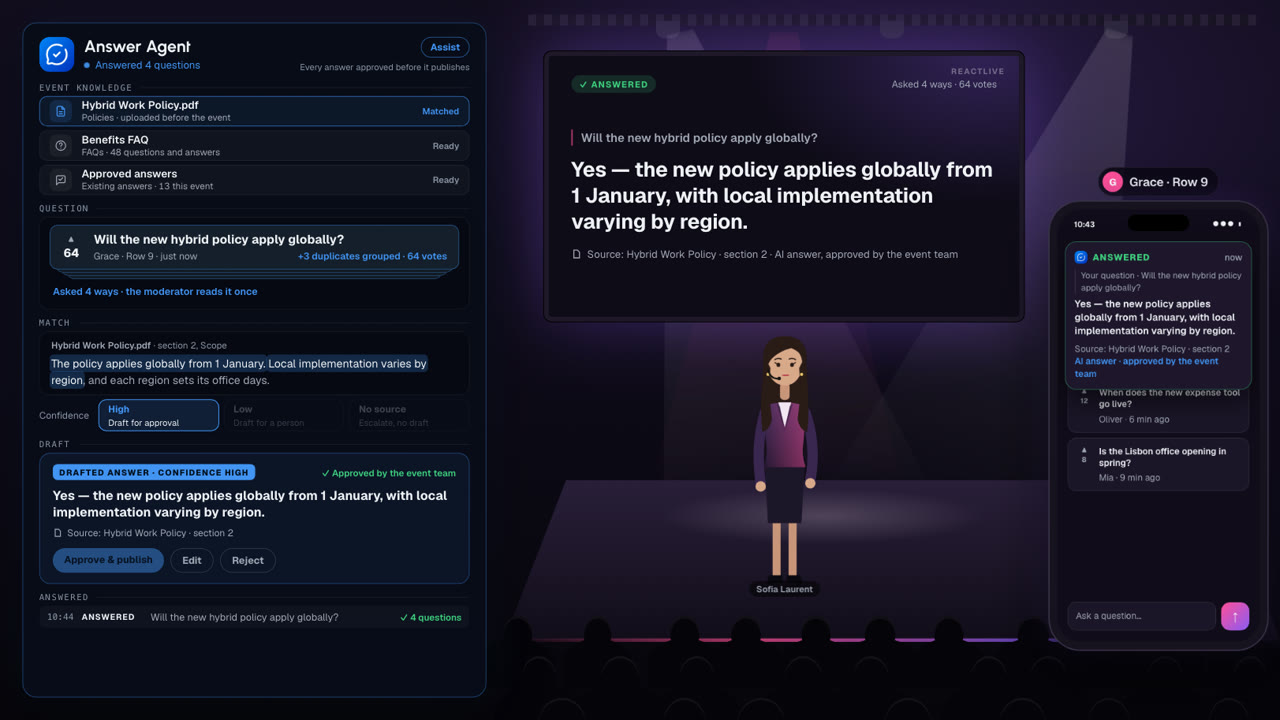
Watch Answer at work.
A town hall in under two minutes. Four questions asked four ways become one, answered from the hybrid work policy with its source and approved by the team. A question nothing in the event covers gets no draft: it goes to a person.
Q&A tools collect questions. Answer answers the audience.
With a question box, the audience asks, a moderator picks favourites, the speaker answers three — and everyone else is ignored. Answer is built on the opposite premise: every question deserves a grounded answer, and your team should not have to write each one by hand.
| A question box | Answer |
|---|---|
| Collects questions | Understands questions — and groups the repeats |
| Three answered, manually | A grounded draft for every one, with the source attached |
| Ranked by upvotes | Ranked by relevance, with duplicates merged |
| “We’ll follow up” | The long tail answered before the event ends |
Only the loud get heard.
Upvotes reward confidence, not curiosity. The quiet majority never surfaces.
The speaker already answered.
Half the queue was covered on stage ten minutes ago. Nobody had time to notice.
The long tail never ships.
The follow-up spreadsheet grows. Trust decays one unanswered question at a time.
Most questions in a live event have already been answered.
Not answered in this event necessarily — answered in a policy document, in last quarter’s all-hands, in the FAQ nobody read before joining.
So a speaker with fifteen minutes of Q&A spends it on questions that a document could have resolved, while the questions that genuinely needed a leader in the room stay in the queue.
- “Will the new hybrid working policy apply globally?”
- “Does the hybrid policy cover our region too?”
- “Is hybrid working the same everywhere or is it local?”
- “Are the office day rules global?”
Four rows in the queue. One answer. A moderator has to read all four to know that.
The Auto-Answer Loop.
Context in, answers out. The detail of each step follows below.
Give it what the audience needs to know.
Your event material — policies, decks, FAQs, previously approved answers — becomes structured, cited context before the event starts. The Stream Agent adds what is said on stage as it happens.
Every question meets that context.
Each incoming question is compared against what you have given it. Clear the confidence threshold you set and Answer drafts a grounded reply. Fall short and it queues for a person — grouped with its repeats, ranked by relevance rather than upvotes.
On your terms. In your voice.
Answers follow the tone, red lines and escalation rules you define. Nothing reaches the audience without a rule or a person behind it — your moderator can edit, withhold or override any answer before it ships.
Answer only knows what you give the event.
Event knowledge is supplied per event. It is not a general model of your organisation and not a crawl of the internet.
FAQs
The questions you already know are coming.
Event documents
Briefings, decks, and material prepared for this event.
Speaker materials
What the people on stage are working from.
Policies
HR, hybrid work, benefits, travel — the documents most internal questions actually resolve to.
Product information
For customer, partner and launch events.
Existing answers
Answers already approved in this event, and previous ones you choose to carry forward.
Setup helps prepare event knowledge before you go live, and Test mode lets you check what Answer produces from it before an audience sees anything.
Answer from your event. Not from the open internet.
Every answer is drawn from the material supplied to the event, and carries the source it came from. If a participant or an executive asks where an answer came from, the answer is in the answer.
No source means no automatic answer.
That rule matters more than any accuracy claim. A confident answer with nothing behind it is the failure mode that ends an internal communications team’s trust in a tool.
Will the new hybrid working policy apply globally?
The new policy applies globally, with local implementation varying by region.
Source: Hybrid Work Policy · section 2
Illustrative view.
The same question, however it was phrased.
Answer recognises repeated and semantically duplicate questions — not just identical wording. Duplicates are grouped behind the question that best represents them, and the vote weight carries across.
When someone asks a question that already has an approved answer, they get the answer rather than a place in the queue.
- A queue of 186 questions reads as far fewer distinct concerns
- Vote weight is preserved when questions merge
- Participants see their question was recognised, not ignored
- The moderator reads each concern once
- Report counts concerns rather than submissions
Confidence decides the route, not the wording.
Confidence is not decoration on an answer. It determines whether the answer can be published, needs approval, or should never have been drafted at all.
- High
- A clear match to a supplied source. Can be published automatically where you have allowed it — labelled as an AI answer, with the citation attached.
- Low
- A partial or ambiguous match. Drafted for a human, never published on its own.
- No source
- Nothing in the event knowledge supports an answer. The question is escalated to a human, with no draft attached.
We do not publish an accuracy percentage for Answer.
Assist first. Auto once the sources have earned it.
In Assist, every answer is a draft. The moderator approves, edits or rejects it, and the audience only ever sees approved text.
In Auto, high-confidence, well-sourced answers can publish directly. Teams usually reach that point after a few events where the drafts were approved unchanged — and often only for a specific class of question, like policy lookups.
Will the AI say something wrong in front of your audience? Not without a person behind it: grounded in your material, carrying its source, and approved before it publishes.
Answer never presents its output as if a human moderator or speaker wrote it.
Let participants ask directly, where you allow it.
Ask Event AI is a feature of Answer, not a separate product and not a general chatbot. Where the event team enables it, a participant can ask a question and get an answer grounded in the event’s own material, with its source.
- Enabled per event, off by default
- Answers only from event knowledge
- Labelled clearly as an AI answer
- Questions it cannot support go to the human queue instead
- Everything asked this way is still visible to the event team
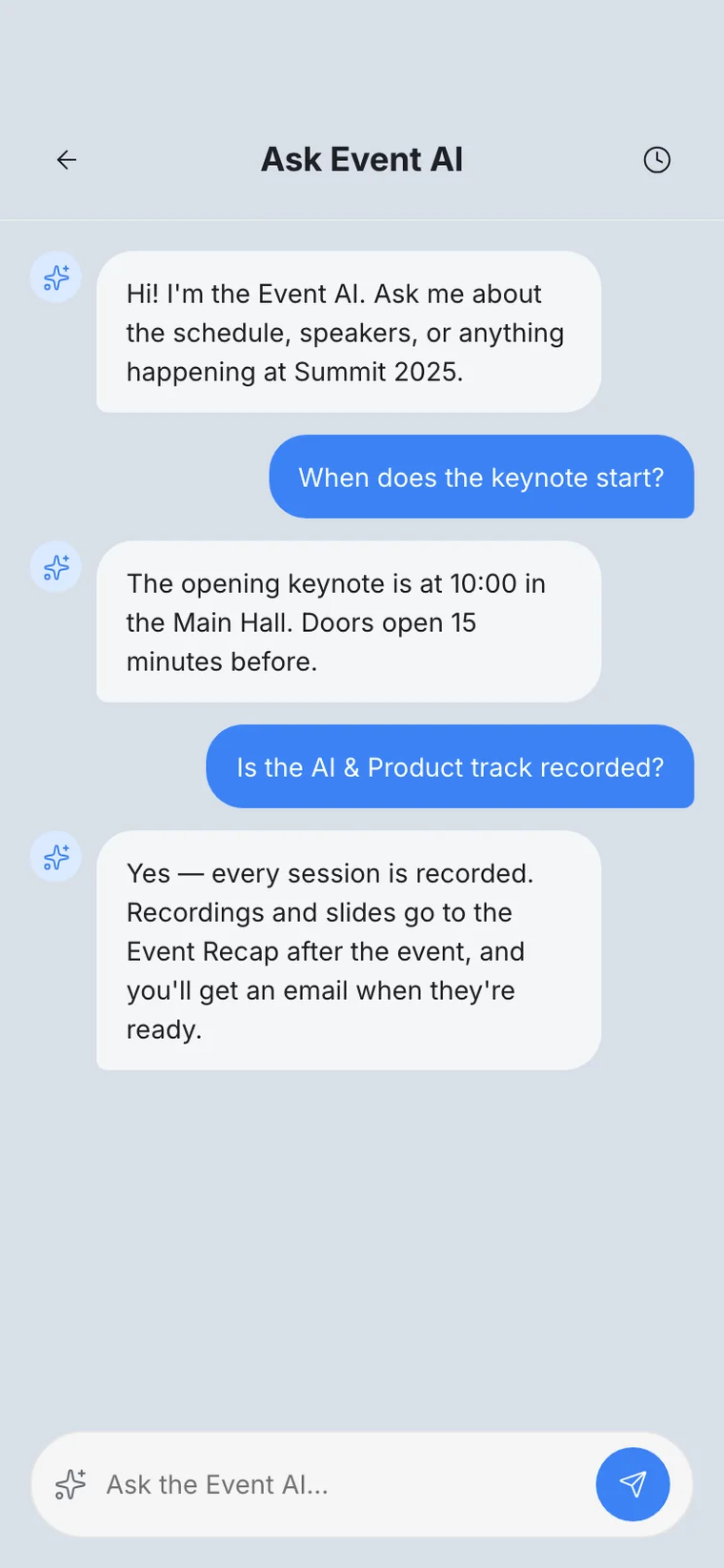
Ask Event AI in the Audience app. Screenshot of the product, running a demo event.
Every published answer can be traced.
Answering employees on the record creates an obligation. Months later, somebody may need to know exactly what the organisation told 2,000 people during a town hall, and on what basis.
- The question, as asked
- The answer, as published
- The source it was grounded in
- The confidence at the time
- Whether a human approved it, and who
- Any edit made before publication
Answer from your event. Not from the open internet.
On the blog: Grounded answers, or no answer at all